Wednesday, April 4, 2012

Is RIM beyond hope?

It's been a while since I had written a post on RIM and thought that it is about time, given that I have some sort of fixation on them having to use them in my daily life. Anyone who has been watching the news recently knows that the company's stock has slid 5% down to $13.65 yesterday, now 75% lower than just 12 months ago, so things aren't going well and like me, everyone is sitting around waiting for RIM's last hurrah when the Blackberry OS10 devices come out.

RIM is in a terrible position right now and I don't at all envy Thorsten Hein's position having all the pressure to do something to try and salvage what is left of RIMs business. The only good news that we are seeing is that he and perhaps the board are starting to see the big picture and do something about it, only that it may be too late.

I think they have done good by:
  • Removing Jim Ballsillie: This might be more symbolic than anything. But since he had been put into the role of CEO and both Mike Lazaridis and Jim Ballsillie landed softly into board rolls Thorsten has never been able to shake the stigma that he is just the puppet of the two former co-CEOs. Initially that's all that it looked like, he came in trumpetting their approach acting like there is nothing wrong, but by getting rid of Ballsillie (not sure about Mr. Lazaridis), they are giving us a sign that he can no longer contribute to the direction of the company and that he really does want things to change.
  • Removing top exectutives: David Yach and chief operating officer Jim Rowan were let go as well as other high level staff. THE PROBLEM IS: While you are getting rid of the 'old' mentality you are going to have to replace them with new bodies. It may prove to be difficult to fill all these high level positions in a short time considering their big turnaround HAS to happen this year.
  • Admitting the difficulties that RIM is facing: It is about time that someone flat out said what was going on with the company. Jim & Mike were always trying to put a spin on the reasons that RIM was faltering and trying to evangelize their plans for a turn around even though it would never materialize. This will give investors and your average person more confidence in a CEO that admits there is a problem rather than living in a time bubble back when everything was still good. 
  • Developing mobile fusion: I was skeptical of this from the start because I thought this would almost definitely cannibalize the sale of their blackberry devices. But since most people are now opting for Android and iOS devices nowadays, I am fairly confident that at some point in the future there will be no blackberry hardware. Mobile Fusion is putting the focus on their back end infrastructure and what is rapidly becoming their most important asset. 
  • Putting a sale of the company or its assets on the table: Old co-CEOs would have only mentioned that they were open to licensing the blackberry OS, as if anyone would want anything to do with what is behind the demise of the company. Putting all the options on the table is good news because it leaves the possibility of a sale out there that could help with investment and also confidence that no option is off the table. THE PROBLEM IS: RIM might be too far gone to be sold, given that it has lost nearly all of it's value. The only thing left that I believe could be purchased is their patents and their back end infrastructure.
What I don't think they have done well:
  • Communicate their direction & message well: Thorsten doesn't seem to be able to communicate direction or if they really pulling out of the consumer market. I have always thought that if they were having issues that they should focus on their core business and try and fix that the consumer part of their business seems to have made them scatterbrained so that they lose focus and what they should prioritize (Playbook, Storm, Torch). THE PROBLEM IS: The consumerization of IT is already in full swing, no one wants to carry 2 devices anymore and want their 1 perfectly capable phone to do everything. They do sort of have their bases covered with Mobile Fusion, but their hardware business is pretty much finished in my opinion.
  • What about the blackberry ecosystem? We don't know what is going happen to BBM or the integration they were speaking of when making deals with the recording industry for Blackberry music. What will happen to all the money invested in music deals for the blackberry music?  
  • Bad publicity: On top of the drunken executives that forced an emergency landing, there was a stabbing at a promotional concert for BBM which seems to have overshadowed the event itself, just like the drunken executives did.
  • Provide message of hope to developers: I am not sure that I have seen any indication in news or otherwise that developing for Blackberry is going to be worth your while. I am seeing that developers will get a free BB10 device, but I don't see them providing any guarantees that they will be handsomely rewarded for developing on a platform that has every indication of failing at some point in time. They should be offering nearly 100% profit for the apps and other incentives to catch developer interest, everyone knows that if you want to make money you develop for iOS and Android, but they need a really good reason to develop for blackberry now.
  • Trying to market an old OS: When they knew they would not be able to ship the BB10 devices on time they decided to drop some money on advertising BB7.  Anyone who has seen any of the ads can only see improvements in providing: Mobile Hotspot (which will be promptly shutoff by most IT policies in addition to WiFi), NFC (no one uses this for payment yet, for now is just a buzz word), WiFi Calling (this is just software, most likely it is provided by carriers, but other apps like Nimbuzz had it since at least 2009), FM Radio (nice to have, but virtually no one uses it), AutoSuggest (Not that I have seen it, but it is most likely tied into google somehow). There really is nothing compelling me to buy a BB7 device, especially since there is no guarantee that my BB7 device can run BB10 when it eventually comes out. You do have to sell the devices, that is a given, but I don't think anyone is naive enough to think that BB7 is a major revolution in the OS... since in my opinion we haven't seen that yet at all (BB2 - BB7, the only things I have seen as improvements are music, camera, expandable memory and some apps. The OS is fundamentally the same... the only real big change I remember is going from a C based OS to a Java based OS). 
I honestly think that for the most part, RIM is beyond salvaging in it's current form as it is too late to catch up with other hardware makers. No one will honestly want to purchase a BB10 version 1.0 phone with no applications when you can get a fully featured Android or iOS device, you would deliberately be committing  yourself to issues similar to those that occurred with the Playbook and OS updates/fixes. So that being said, this is how I see the future of RIM:
  •  RIM gets purchased outright: I can see either Amazon (because Jeff Bezos seems to love RIM) or Microsoft purchasing RIM. Amazon has the kindle, kindle fire to tie into their ecosystem, but they do not have a phone. They could use RIM to break into the enterprise and also to manufacture Android phones to fit the hardware that they are missing when compared to Apple/Google. Microsoft could purchase them just to deepen their foothold in the enterprise and lock down Windows Phone 7 as the only enterprise capable phone (probably getting rid of Mobile Fusion save for Windows Phones). Windows Phone 7 definitely needs some sort of edge in hopes of catching up to Android and iOS, so anything could help.
  • RIM leaves the hardward business and focuses entirely on enterprise software: They are already well positioned to do this with Blackberry Mobile Fusion, so they could pool there resources around owning Enterprise Device Management and E-Mail. To this day there is still no device that does e-mail better, so if they can enable this on Android & iOS phones (like they did with the PalmTreo650) then they would own that space. Good technologies is attempting to take ownership of this space, so they would be their biggest competitor. RIM could then live off the licensing fees of Mobile Fusion and look for other areas where they could add value.
  • RIM switches to Android: I am not entirely sure on this, but it is possible that if BB10 is a complete flop, that it would be far less expensive for them to become an Android handset maker in addition to being an enterprise device management leader. So if you can't get the developers to come to you, you can go to Android where the developers are and continue to make money on handsets as well as licensing. Mobile fusion would then theoretically allow them to do this almost seamlessly as they are trying to address the BYOD movement with the software already. 
I don't really see too many options beyond these, and time is of the essence for the sale of the company as it has lost so much of it's value it may not be worth selling. I do think they can succeed as an enterprise software provider and I fully expect them to do something like this if BB10 turns out to be a complete flop.

I wish them the best, I really do. I don't hate them, I just hate the OS and it's lack of functionality. I will be watching their developer conference with interest (to get an idea of what BB10 is like and its functionality). Come November, if we are not blown away by the new devices and software I can see one of the above scenarios playing itself out.

Friday, March 9, 2012

Windows 8 Consumer Preview

Microsoft announced on February 29th, 2012 that they have officially let the Windows 8 consumer preview loose on the world making it widely available for download. Seeing that news, I had about a 2 - 3 minute fight with myself as to why I should or shouldn't ruin my perfectly good Windows 7 installation before my curiosity won out and I went to the website and downloaded the web install (thinking it was just a download tool that would give me an ISO file to burn). So I would like to share with you my experience with installing the new OS (twice I might add), what I think of it and definitely all of the things that needs to be improved.

I thought it would be best if I broke this down into 4 sections:
  1. Web Installation
  2. Fresh Installation
  3. Brief overview
  4. What needs to be fixed
I won't get into any detail as to how you configure it or any of the nice new features as that would take quite a bit longer and I have to admit that I don't have it all figured out yet. I will however share something that helped me clean up some tiles and soothe some of the 'Start Menu Withdrawl' that all of us that aren't using it on a tablet will have.

Web Installation:

To be honest, I thought that the web installer was going to be one of those download tools that you HAVE to use to get the ISO down from wherever they wanted to hide it. I was quite surprised that it was actually the install tool an was going to upgrade my Windows 7 Professional installation to the new Windows 8 preview.

I am actually quite shocked at how well this worked, and if it wasn't for the fact I generally think it is not a good idea to upgrade from any previous OS (except Linux with keeping the /home partition) they did everything exactly right. You click on the installer, it downloads, installs and reboots and depending on your download speed, you are up and running with a new Windows 8 installation, as simple as installing any other program on the system.

The only caveat that you must know is that there is NO UNINSTALL. You can't simply try it out and uninstall it, it alters your system so much that this is not possible. So consider a virtual machine if you do not want to lose your existing Windows installation.

When I did try out the OS I did have a lot of left over garbage from my Windows 7 installation (namely the fact that I used a Mac theming program to make my system look like it was running OSX Lion). Some programs didn't work and there were a few other oddities, which is why I recommend that if you are going to try this, do a FRESH INSTALL. At least that way you know that everything is working as they had intended it to.

Fresh Install:

So with all the problems that I was having with the web install version of Windows 8, I wanted to start from scratch, so I went poking around for the Windows 8 ISO download. You can find it if you look, but I was maxing out at a 67KB/s download rate, which would have taken forever to get down to burn onto a disc.

Web Install Tip: If you have done the web install (which is super fast I might add), then you already have 2.8 GB sitting on your C: drive doing nothing. So rather than download the same thing twice, you can take what was placed on your hard drive for the web install and make that into a burnable ISO file to do your install. Here's how you do it (bear with me, this is from my memory as I finished the fresh install):
  • Locate C:\WindowsEDR (or something like that) to ensure that you have the necessary files. The directory should be around 2.8 GB in size.
  • Download this tool: http://www.sevenforums.com/attachments/installation-setup/72576d1273718566-boot-cd-dvd-bootisomakerv2.zip 
  • Unzip the tool and then run the batch file within it.
  • It will ask you for the boot.wim file, so go to C:\Windows EDR\Sources and select boot.wim.
  • Once you pick the file the program will begin to make the ISO file from the downloaded web installer files.
  • Once the ISO is created (it will be created in a 'VirtualStore', so you may have to search for it).
So using the above steps I took the windows install files that I already had, created an ISO and then burned that to disk, much better than the 13 hours I was looking at for the ISO download.

The install of Windows 8 is identical in almost every way to Window 7, so it shouldn't be to hard to figure things out. I wiped out my entire drive and let Windows 8 have it's way with the file system.

Once the install was done, the system booted up and I began once again to setup Windows 8 from scratch. I have to admit that it is much more fast than the upgraded Windows 7 version and also a lot of things that were previously causing me issues were now gone.

Brief Overview:

As a user of Windows since version 3.1, I have seen every evolution of the OS and the revolution that happened since they switched over to using Windows NT technology, vs. the older DOS/Windows combination I thought I would be able to figure Windows 8 out relatively quickly, but I was wrong. The changes that they have made to the OS up front are quite strange and anyone used to the traditional Windows "Desktop" metaphor will have some things to get used to.

Metro UI:

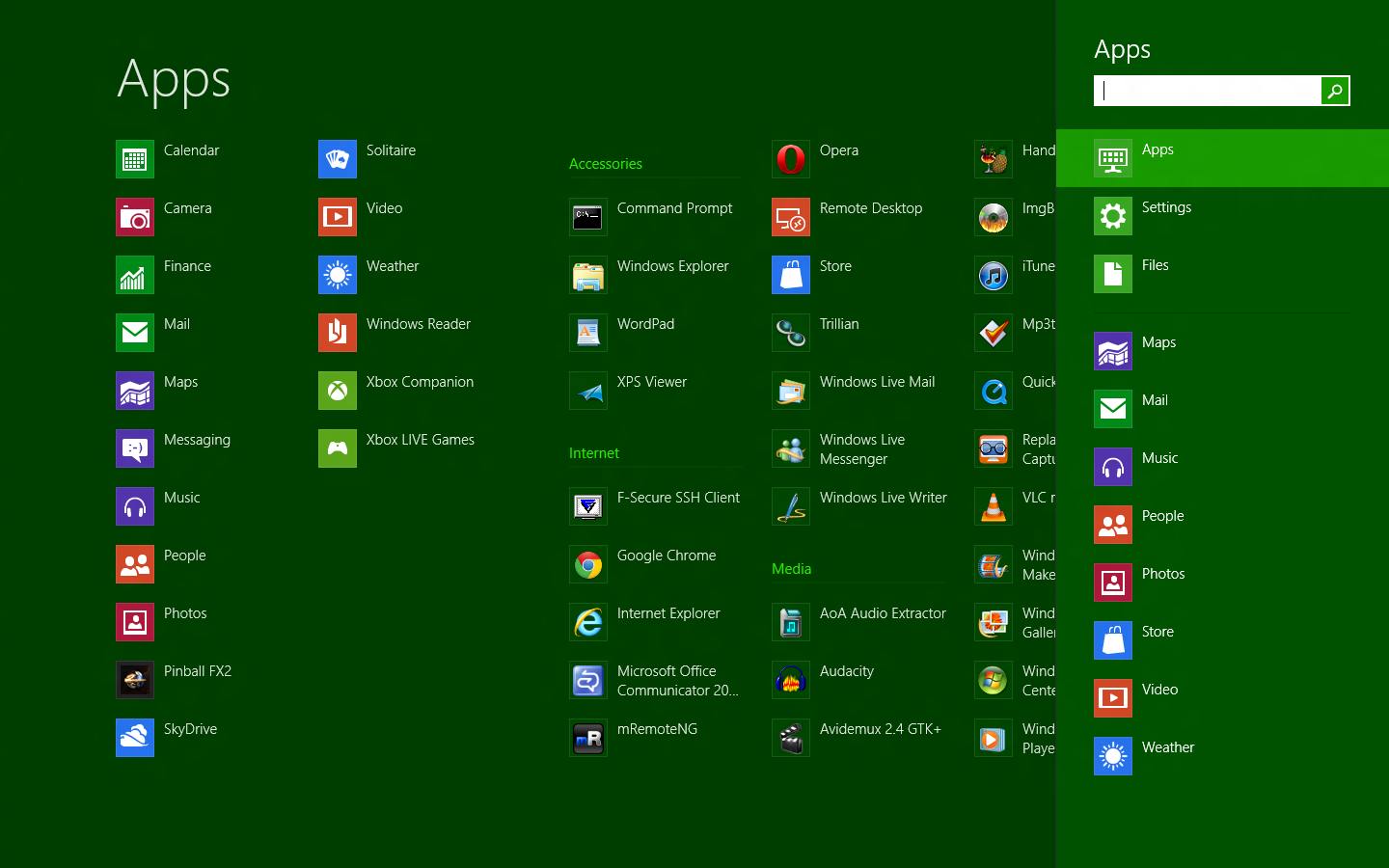
This is supposed to be the greatest advance in Windows since the switch to NT technology, but I think it falls quite short of a great advance. The first thing you will notice upon completing the various setup screens is that at the end of it all you will see this tile interface:


Metro UI

It will probably look a bit better than this given that I have changed a lot of it, but essentially you will be looking at this screen. Now before I go too much further, a colleague of mine at work looked at the UI today and said... "Hey, that looks like Lotus Notes!" I thought to myself... how does it look like Lotus Notes? Then it dawned on me... the little program squares do look JUST like Lotus Notes databases on the workspace:

Lotus Notes 6.5.1
Metro UI Application List
I thought it was hilarious and also somewhat uncanny. 

Application Selection:

Metro reminds me somewhat of Gnome 3.0 in the sense that you have a screen that you use to type a search term for the application you want, or you just click it from the screen right in front of you. Non-touch screen users of Windows 8 (myself included) have no reason at all to stay in the Metro UI as it doesn't really serve any purpose for people using keyboards and mice, it actually makes Windows look a little unkempt. 

Gnome 3 Application switcher/search
Metro Application search
Metro App Switcher:

When in Metro or Deskop, when you move your mouse up to the top left corner of the screen you get presented with an application switcher. Before you get too excited, it is not at all like the way the workspaces work in Gnome 3 nor is it a fancy new way of switching between applications in Windows 8, it's sole purpose is to help you switch between Metro apps.

The switcher works almost exactly like the Android recent applications function works, and it should because it is pretty much identical, just useless for Desktop users.


Charms:

Not sure why they call them charms, but when you move your mouse pointer to the top or bottom right hand corner you get a bar that slides in. The bar itself is not customizable and only has 5 items on it: 
  • Search: Which takes you back to the application search window.
  • Share: Which doesn't seem to be what you would expect for something that says 'Share'. It seems to share specific things and doesn't work the way sharing a folder might work. Try as I might it wouldn't let me share anything at all.
  • Start: Brings you back to Metro
  • Devices: Is again another example of not getting something you would expect such as all  the devices that are removable. I only ever get shown 'Second Screen' when I click it.
  • Settings: This is about the only useful button on the whole thing. From here you can go to the control panel, install themes, view computer information, alter your sound, brightness, networks and notifications as well as power down Windows (which is actually tricky since there is no start button).


Cloud Integration:

I haven't tried this out too much but the OS seems to tie in with SkyDrive as well as all the major social networks. I also didn't have to create a local ID as I am using my hotmail credentials to log into the machine (even when I am not network connected). If it does a better job of integrating with the cloud, I can see why the cloud is becoming an important part of an OS. If it is anything like what Google has done with Chrome, then (namely upon sign in all your apps, settings and bookmarks are restored) then this will be a great feature.

Skydrive is available (so far as I can tell) only via the Metro start screen. When you click on it, it basically brings up more squares showing some pictures and some folders that you may have up in the cloud:

Skydrive Layout
While you can go through items in your Skydrive and save items locally by right-clicking the item, there is no way that I could find to send a file up to Skydrive. 

Ribbon Everywhere:

Explorer Ribbon
For the desktop, the Office ribbon has made it's way to Windows explorer and most MS products now have the ribbon interface.

What needs to be fixed

It is very clear from this demo that they are pulling away from the traditional 'desktop' metaphor and moving into Apple's 'app' model, which makes sense especially with the focus being seen on tablets and mobile OSes. They are also attempting to unify the experience across phone, tablet and desktop (possibly Xbox??) to make it easier to develop for and also reduces the learning curve for each of the listed devices, which also makes sense.

The problem is that it appears for the moment that they are going to do this at the expense of their biggest user base, the 'Desktop' user. When installing the consumer preview on my own system, it did take some time to find out where things were and to get accustomed to certain things.  But one thing that I don't think that any Desktop user will get used to is the fact that the Desktop is now an app and that you will always have to look at that big blocky Metro UI if you want to launch a program. I imagine that the outrage over this  and the fact that this couldn't possibly work for a business user will inevitably lead to allowing the Metro UI to be disabled in favour of the start menu, but time will tell.

In the mean time, if you do 'sorta' want your start menu back just create some links to your user start menu and to the all user start menu so that when you open explorer, you can navigate to the programs you want or clean up the start menu junk as I like to do. You can find the directories here:

Your Start Menu:C:\Users\<yourusername>\AppData\Roaming\Microsoft\Windows\Start Menu\Programs
All Users Start Menu: C:\ProgramData\Microsoft\Windows\Start Menu

Here are the things that I think they should fix:

MetroUI as an option: 


As I said earlier, they are going to be alienating all of their Desktop user base with this release and possibly working on the next Vista debacle unless they make this optional. Even if they want to 'force' people to adjust to the new reality of friendly touch interfaces and OSes, there is no way they can make this big of a jump so quickly. I am technical and have no problems using Windows, but even I had problems getting used to this OS and finding anything in it, I shudder to think of what might happen to people like my parents if they happen to buy that next computer with Windows 8 running on it.

There is also the fact that the enterprise will never buy into this. Unless there is another SKU for Windows in the enterprise you can expect the vast majority of companies to stick with Windows 7 about as long as they had stuck with Windows XP. And if there does happen to be a SKU, I wouldn't think it is hard to imagine desktop users flocking to buy it vs. the consumer release of Windows 8.

Make it an option and save yourself and everyone else a headache, the UI doesn't make sense on a non-touch PC.

Shutting down the PC:


Believe it or not it is hard to figure out how to shut down your PC. I couldn't find it initially, so to shut my system down I resorted to running 'shutdown /i' so that a window would pop up to allow me to shut the system down. To my surprise, despite my explicitly asking the system to shut down it only hibernated (albeit quickly) and when I started the system up from what I thought was a cold boot I was surprised to find some programs I had previously opened reloaded.

This appears to be another Microsoft attempt at pushing us towards purchasing that Windows 8 tablet because this hibernate/suspend behaviour would only be good for a tablet device. In my case, and what I will mention next, I was having an issue with my wireless card connecting to anything. The first thing that anyone typically does is restart the computer to start fresh and eliminate any possible issues that might have caused the problem.

Full Screen Apps:


I have tried some of the apps that they include in the beta, and while they are nice and clean, they lack the functionality you would expect on a regular Windows program. Essentially, the apps themselves are tablet oriented (of course) but since I am using the app on a laptop computer I would expect to get a little more functionality. Granted, this is a beta, so I can't have too many expectations and can only base my opinion on what I am playing with, but I really think that they need to ensure that there are sufficient options for Desktop users. The reason that I bring this up is that I have heard that the 'Windows Live Essentials' package, which in my opinion is essential is going to become a series of apps rather than a series of desktop applications. They did wonders with Windows Live mail, MSN messenger and the Movie Maker/Photo gallery applications, it would be a shame to see these applications go from being feature rich to barebone and tablet optimized. I don't think it is possible in every case to have a one size fits all approach to applications since Windows didn't start that way. They can certainly share apps, but going from feature rich applications to tablet apps on a desktop is not ideal. Hopefully this does not become forced, or even gently nudged given that many developers will want to get onto Windows On Arm for the tablets.

Settings


No doubt this is most likey a result of it being a beta, but I have to say that the charms and devices listed in the Metro UI version of settings is not cutting it. When I have my laptop docked at work and some USB devices plugged in I only ever see something about configuring a second screen. Perhaps it is a problem with my system, but it is also very confusing to try and configure a laptop when there are very limited options from Metro.... I think I would scream if I didn't know how to bring up the control panel or any other application that I was used to previously. And if they strip the old settings out completely, that will be 'interesting' to say the least.

Enterprise Applications


They should include an older version of IE or some sort of compatibility mode for existing applications with it. It is fairly early to say, of course, but one of the biggest problems I had is that virtually no web application would work with IE10. I had to try and make due with Firefox... and that was difficult. Definitely will need this compatibility (and it will most likely be there when then deploy) for the enterprise.

Sliding up to login


I would have thought that the OS would know that I am not on a tablet, because it doesn't make sense to me as a laptop user to have to use my mouse to swipe up, and in effect simulate a tablet touch to get to the login prompt.

Summary:


I think Windows 8 is worth a try, but it is very difficult to live with as a beta, which is what lead me to remove it and install Windows XP/Ubuntu 12.04. What the deal breaker for me was that enterprise applications would not work, my system would never actually shut down and everytime I did start it, it would have networking issues that were only solvable by running the troubleshooter.

From an upgrade perspective, I think it is asking too much though (at least for now). While I am fine with learning something new I know for a fact that it will perplex my parents and other non-tech literate people, since they are barely used to the current version of windows.

I can see this being a future play, something for a long way out as it is tablet centric. Sooner or we will not need that PC or laptop as we will be able to get all our work done on portable devices (phones & tablets) and even a laptop PC will be exactly what the laptop is currently to the desktop... a big heavy and cumbersome thing that is not convenient to bring with us or use. So in that respect Windows 8 makes perfect sense to me, I just don't think it is quite ready for general use. We also have to wait for a time when there are new devices that can accomodate all of the changes they have made in Windows8.

Update 05/05/2012: While playing with Windows 8 CP, I have been noticing that the computer never really shuts down, it either sleeps or hibernates. Ever single time it comes on the network card (both wireless and wired) do not work. I always have to troubleshoot them to get them back in working order. Not sure what that is about, but it is a pain. If we could just shut down our computers, that would be great too.

Wednesday, February 22, 2012

Samsung Galaxy Gio - Unlocked on Rogers


If you have read any of my previous posts you have no doubt seen what I have had to go through in order to make my hand-me-down iPhone 3G work in any sort of acceptable way. If I am not mistaken, I have posted 2 or 3 entries here on how to make the phone 'liveable'.

Well, today (actually Feb. 18, 2012) that all comes to an end, I am leaving my iPhone 3G for a Samsung Galaxy Gio. In your head you are probably saying, Galaxy Gio? Why would you choose some low-end hardware and not a Samsung Galaxy S II or something like that?

Well... you have to remember, I get hand-me downs because I am not able to commit to a 3 year contract for one of the nicer, newer models and I also can't fork out $600 - 800 on a cell phone (I am not sure how anyone can because of how fast they become outdated). So let me tell you how/why I bought this phone.

Backstory:


I have had this phone ever since I have upgraded my wife to the iPhone4, just before the iPhone4S and have been on a daily basis living with the fact that I only ever really have about 40MB of usable memory that gets eaten up quite rapidly by just one app.  Over time, when using it, it is not uncommon to wait 2 - 3 minutes for an app to load, have to load the app 2 - 3 times as it would crash shortly after the load screen or just completely lock up the device using up all its available memory. With such a low amount of RAM it then becomes a concious effort to load only a certain amount of apps, or in a particular order, which started to drive me nuts.

I had tolerated this for quite some time, but the final straw came when I was trying to discretely write something nice in an e-mail to my wife for valentines day on my iPhone3G. I had spent a good hour pecking at the small virtual keys to pump this e-mail out only to have the phone freeze just before the completion of the message and the app close automatically due to memory constraints wasting all the effort (mainly typing on that keyboard). I couldn't take it anymore... so I began devising a master plan on how I can fix my particular problem, but on the cheap.

Research:


So being hell bent on replacing the phone, I began searching around for a way to keep my existing SIM and service, but get a new Android or iOS phone.

OK, you caught me... I didn't even look at the iPhone because I loved my tablet and I wanted the same experience on my phone. So given that I want an Android phone, what are my choices here in Ontario, Canada?
  • Rogers
  • Telus
  • Bell
  • Koodo
  • Virgin Mobile
  • Fido
  • Wind
  • Moblicity
  • Public Mobile
And when you really boil it down there are only 6 choices since Fido=Rogers, Virgin Mobile=Bell, Koodo=Telus, so the search was on for a decently priced Android phone from any of these companies or even on-line via eBay or Kijiji.

One thing I noticed rather quick was that it was more or less impossible to get any of the Android phones released in the last year or two because they were all tied to 3yr contract commitments of $50+ or they were  $500 - 700 to buy right out. As I mentioned previously, both of these choices are a problem for me and I had to immediately rule them out. Instead I would have to find a way of getting the phone I want, but in an affordable way.

Then, I remembered an ad for Public Mobile that I had seen them around where they were advertising a $100 android phone, but it was from some obscure Chinese manufacturer. I wasn't really into buying a phone from a manufacturer I hadn't heard of, but it did give me the idea of going to one of the bigger carriers in search of a pay-as-you-go Android phone. My first thought was to go to Virgin Mobile, they always seemed to be so cool and friendly </sarcasm>, so I poked around their website and found some Android phones available priced around $199. 

I had a device in mind and decided first that I would talk to a Virgin representative to find out if they could unlock the phone for me if I bought it right out. Their response was essentially the primary reason that I didn't buy the phone and went looking elsewhere, it went something like this:
  • Me: Hi Virgin, just wondering if I spent money with your company and purchase a phone outright, would you be kind enough to provide a network unlock code so I could use it with my existing plan?"
  • Virgin: Hey there! We definitely want to help you with unlocking your phone if you purchased it from us.
  • Me: OK, so how does this work. If I buy a phone from you, would you essentially hand over the unlock key with the phone so I can use the phone I purchased outright any way that I want?
  • Virgin: I am happy to tell you that if you purchase a phone from us, you can definitely have it unlocked. There is just a few things you should know before getting your phone unlocked.
  • Me: Alright... what's that?
  • Virgin: Well, first... if you buy the phone outright from us, you need to create an account with us for at least 30 days and the phone needs to be active. This will either be a regular plan or a month-to-month, and you may have to pay early cancellation fees if you go on one of the regular plans.
  • Virgin: Second, you need to provide us with $75.00 for the phone to be unlocked. Please bear in mind that if you send your phone in for warranty unlocked it will be returned to you locked, you will then have to pay another $75.00 to get the phone unlocked again.
  • Me: That's insane. So you are saying for a phone that I paid full price for cannot be unlocked unless I pay you for 30 days of phone service that I don't want just so that I can later pay you and additional $75.00 to unlock the phone (most likely out of my site without providing the code)? You have to be nuts!
I couldn't believe it! Full price for a phone and I am still somehow locked into the vendor? They are milking customers for every last dollar... I did some further reading and found that it was seemingly worse with other providers. So now that I was put off from that Virgin Mobile exchange, I went hunting on-line for pay-as -you-go phones from other carriers. My next stop was Koodo, for the Samsung Galaxy Ace.

The phone looked great and looked like it would do everything that I wanted... I was literally moments away from buying one before deciding that I need a bit more information on how it would work to unlock the phone. Lucky that I did because Koodo doesn't use the same radio frequency as its parent Telus or Rogers and Bell, which is 850Mhz. Koodo uses 900Mhz & 2100Mhz for their 3G signals which would have essentially meant that I would be stuck with a phone that only ever had a 2G (edge) signal. So before you buy that phone MAKE SURE your current providers UTMS/HSDPA+ frequencies match those of the phone you are buying (in my case 850Mhz). 

Now that I am aware of the frequency issues, my choice of cell phones was restricted only to what Telus, Rogers and Bell could offer me (since they all use 850Mhz for 3G). Rogers is pointless, because they clearly do not want you to have a smartphone without a contract as there isn't a single Android pay-as-you-go phone, which leaves only Bell and Telus. Telus had the LG Optimus One and Bell had the Samsung Galaxy Gio. Once you compare the 2 phones, the Samsung Galaxy Gio clearly comes out the better looking and more functional of the 2 Android phones, so I bought that one. The fact that I also got an extra $50 off the $129.99 price didn't hurt my decision making either. 

Unlocking:

I was very excited about the purchase of my new phone and couldn't wait to start using it, but it is definitely not going to be on the Bell network (since they have terrible pricing and also since I already have a plan). Initially, I spent a good day looking all over the internet on how I could unlock the phone for free, but with no luck, it seems as though secret of unlocking cell phones is like the secret behind a magic trick and it is closely guarded and can only be known to magicians.

So rather than go free, I thought instead I will put up some good money to get it done right the first time... which eliminated almost every single site that offered unlocking for less than $20 (they were probably mostly scams anyway). After much research I eventually narrowed my selection down to these companies: 
  • www.cellunlocker.net
  • www.mobileincanada.com
  • www.foneszone.co.uk
In the end I chose www.cellunlocker.net because the website was decent, it had a support forum, a phone number and an order tracking system. I assumed they couldn't possibly rip me off if they invest so much in providing support. So I got PayPal ready to go and gave them $32.99CAD, which is the cost of unlocking a Samsung Galaxy Gio. They said that it would take 1 - 3 hours to provide me with the unlock code via e-mail and after payment I waited patiently for that e-mail that was the key to freedom, not entirely confident that I would ever receive it.

2 hours later, I did. I shut off the phone, put in the non-Bell SIM card and when the phone asked my for the network unlock key, I punched it in and was ready to go on the Rogers network in seconds.

Note: If you reset your phone to factory after unlocking, you have to re-enter the code to unlock it as the restore puts it back into a locked state.

Using the phone:

The difference between the Gio and the iPhone3G was like night and day. Once I got some applications on the phone I was launching the Facebook mobile app and within seconds (not minutes) I was in looking at content. It was the same for all the applications that I had tried as well.... I was sooooo happy.

Happy, that is, until I tried to load all of the programs that I had on my tablet and then quickly discovered that I was out of memory and could not install any more apps. Bummer!

It was only then that I realized that the Samsung Galaxy Gio only had a total of 180MB of internal memory for apps. And despite me telling it to install all the apps to the 16GB micro SD card I had in the phone, the internal memory just kept coming down. So, I went to google in search of a solution.

Initially I found a utility called 'DarkTremor A2SD' which supposedly tricks the phone into thinking that the SD card is actually the internal memory of the phone. But in order to use this, or anything else useful I needed to 'root' the phone in order to get things going.

I searched everywhere for instructions and eventually came across this site. It provides the correct update and instructions on how to root your S5660 (aka Galaxy Gio) phone. The process, to my surprise, took less than 5 minutes and required absolutely no technical knowledge... simply shut off the phone, turn it on again holding the home button and then apply the update to the phone from the SD card (the file has to be in the root).

First problem solved... the next problem was to get DarkTremor to work. I did find something on the marketplace that was a GUI for DarkTremor, but it required scripts and an EXT3 partition on the SD card to work (and possibly updates to the init scripts). Though I did install it and messed around with partitioning  the SD card I could never get things 'Just Right' in order to have DarkTremor GUI to open and let me start tricking my phone. I did contemplate going to SimpliGio or GioPro v1.4, but I didn't have a lot of time to sort through the complexities of flashing my ROM and I really didn't want to risk losing the phone I just purchased... so I opted not to proceed. Instead, I began searching for a replacement program that would do the same thing, but easier and LUCKILY I found the program 'Link2SD' which does the same thing as DarkTremor A2SD, but much, much simpler. So I downloaded it from the market and installed it on my device.

Once installed I thought things would a bit more straight forward, but I still kept getting errors about the 2nd partition despite the fact that I had partitioned the poor card every which way I could think of. It was when I stumbled across this article that things made perfect sense (since Link2SD was always looking for a 2nd partition)... You have to make a FAT partition first, followed by an EXT2 (or probably FAT) partition for the apps. Once I did that, Link2SD worked for a charm and has been saving internal space on my Gio like crazy.

Summary:

This by far was the best deal that a person could get on a brand new Android phone without being tied to a specific carrier and a 3yr contract. The phone is fast, has good programs, takes good pictures, has expandable storage, has a changeable battery and uses a standard MicroUSB cable to charge.

I am loving the phone and do not miss for a second my iPhone3g. If you want a good performing phone for a good price, don't hesitate to do this. I didn't have any problems with www.cellunlocker.net, so I recommend using them to unlock your phone.


Abandoning the HSS-RIM


I was recently reading an article from the financial post that stated 12,635 US government employees next phone will be an iPhone rather than a Blackberry thanks to the General Services Administration which procures devices for the government. This comes right after Halliburton announced that 4,500 of its employees would be switching as well.

This is not entirely unexpected after the years of missteps by RIM, it is becoming a lot harder to have faith that they are ever going to do anything about it. Couple this with the 'consumerization of IT', where most people and some companies are willing to forgo a stable and secure e-mail system for one that has new slick hardware and a big repository of apps to select from. I actually think that this is just the tip of the iceburg when it comes to people moving off of RIM to other devices, and here why:


People will bypass enterprise security for features:

Most enterprises around the world have the blackberry for 2 reasons, security and reliability. This more or less means that if you are an enterprise employee in 2012 or before, you are for the most part going to have a blackberry to receive your corporate mail and calendar. That blackberry is most likely not going  to have access to anything useful and will drive those who want access to social networks or apps circumvent corporate security to get the features and applications they want on a phone. Corporate executives are typically the worst offenders for this by either being 'exempt from policy' or using another device that they like rather than the Blackberry.

People want to be social:

Everyone wants to be social, it's almost like now a days there is no choice... you simply have to be on Facebook, Twitter, Google+ and other social networks to find interesting information and connect with friends and family. Especially in the age of Twitter when you can post about everything that happens on your way through life, you want to be able to keep up with people and say what you want. Of course this could be a liability to the corporation especially if someone thinks you are saying something on their behalf, so you will find most devices have Facebook & Twitter locked down and or blocked on the network. This is changing slowly, but for the time being it is restricted for most and makes people do other things again... to get around the problem.

People want to use apps that will enhance their ability to work:

In the beginning there were really no applications that were compelling enough to actually want to put them on your iPhone. But nowadays, the 'app' is not only another way of interacting with customers, but can also be something that is used to enhance the employee experience. Even if there isn't a 'work centric' application for the iPhone, there are plenty of other applications on the phone that can enhance personal productivity. This is one of RIM's biggest weaknesses, as they are in mid-transition to a newer operating system, so their platform is technically in limbo. Would developers know what to develop for? OS7? OS10? HTML5? Are the tools even sufficient? Even if they are or eventually will be, are there enough Blackberry users left for them to make money? Bottom line, there is no comparison for application diversity.

People DO NOT want to carry 2 phones: 

This is an age old problem that started with pagers before the blackberry phased them out. But now that we have iPhones and all our media purchases locked into the Apple ecosystem and most of us don't really feel like using our Blackberries for music or anything else besides mail. So most of us carry the iPhone or Android phone to work for apps and music and the Blackberry only for enterprise email. No one wants to do this anymore, we all want the simplicity of having everything all in one device with some sort of magic protected area for sensitive corporate data.

Summary:

So even though the US government and Halliburton are switching from Blackberry to iOS is a drop in RIMs enterprise bucket, I believe that it is the beginning of a trend. With tablets becoming more commonplace, new apps coming out all the time and the amazing new phone hardware coming out constantly, whatever RIM is doing now is most likely too little too late.

If they are just releasing an update to the Playbook that 'should' have been Playbook 1.0 with no features other than what it should have shipped with initially, it doesn't spark too much confidence in what they will release as Phone OS v1.0. And even though the 'next gen' devices do look amazing from a hardware perspective, my guess is that is all it will be, hardware. RIM is great at hardware but it is the software that is going to make or break the phone and if the software ends up being remotely close to OS7, or its release is much like the original Playbook release, then I am afraid that their boat will be sunk.

I really hope they knock our socks off with that first new device, but we can't get our hopes up given their past promises. But you will definitely see what will become of RIM only a few short weeks after the initial release of the new phone. If it doesn't live up to the hype, they will be severely punished by the markets and will have lost the tiny bit of faith we are all holding onto for them.

Thursday, February 9, 2012

iPhone 3G performance tweaking

Since I have recently given up on the benefits of running iOS3 via Whited00r on my iPhone 3G and I am now on iOS4 I needed to find a way to tweak my phone to get back some of the performance that I previously had. Running Whited00r on my 3G gave me a pretty good idea as to how I could get this performance back... and then some. So this post will be dedicated to tweaking the 3G to get some of your speed back on iOS4 and some neat features thanks to some great programs made available to a jail broken device.

Requirements:
  • A jailbroken 2G/3G/3GS, running iOS4. 
  • Multifl0w: Expose type multitasking for the low price of 4.99 at Cydia () 
  • Backgrounder: Available for free via Cydia. 
  • iFile: Usable version available via Cydia. 
Post-Jailbreak: 

After putting your device back to iOS4 you will need to jailbreak your phone, to do that, I recommend you restore your device back to iOS4.0.1 and use jailbreakme.com. It is dead simple and always works, it is also way more reliable than the other untethered jailbreaks. Once you complete the jailbreak, you will need to do some minor tweaking to get your background wallpaper (if you care), but NOT mutli-tasking. I have found over time with the iOS version of multitasking keeps a very looooong list of applications that were previously used and despite what people might say I am convinced (but with no proof) takes up a ton of memory (and only we that are stuck with older phones would notice). Rather than rely on this method of multi-tasking we will let 'Backgrounder' do the work and leave the Apple multi-tasking off.

So if you don't already by this point have Multifl0w, Backgrounder and iFile, just hop on over to Cydia and grab them. Now if you have iFile, use it to navigate to '/System/Library/CoreServices/Springboard.app' and locate the file: N82AP.plist. If you are using iFile you can select the file and then click the 'Text Viewer' and then click the 'Edit' button. Add the following lines:

<key>homescreen-wallpaper</key>
<true/>
<key>multitasking</key>
<false/>


Once you are done click 'Save' and then power off your phone and power it back on again for the configuration changes to be read by your phone. Now that all the necessary programs are installed and configuration completed, we can proceed with the software configuration. 


Multifl0w: 


Multifl0w doesn't really need to be configured anywhere but Activator, so there is not much work to be done here. The sole purpose of using Multifl0w is so that we have a task switcher available when we have disabled the native iOS utility. It is possible that there are other free ways to do this, if there is, let me know. But the interface for Multifl0w is quite nice, so it is most likely preferable. 


Backgrounder: 


Backgrounder will be one of the 2 icons that will be placed on your phone once the installs have completed. Before we get into any extensive configuration (via Activator) we should take care of how multitasking is done. 


Open Backgrounder by clicking the icon. You will be presented with 4 choices: - Global - Overrides - Control (via Activator) - Documentation You will first want to go into the 'Global' section and configure how Backgrounder is going to behave. Configure it in the following manner: 


Global: 
  • Backgrounding method: Forced. We want to make sure that we aren't using anything that would try and use the native multitasking.
  • Fall back to native: Off. This will ensure that every application you load will by default quit when you go back to the home screen. We want to make sure that the apps we want to keep are forced into the background by us.
  • Background state (there are 2 settings): Enable at launch, disabled. We want to make sure all applications are set not to stay in the background at launch. Stay enabled, On. We want to make sure that if we select something for the background, that it stays enabled until we say otherwise.
  • Indicate state via (there are 2 setting): Badge, on: This will tell you on the app icon whether or not it is backgrounded. Status bar icon, on: This will show that there are backgrounded apps in the status bar. Activator should come with the installation of Backgrounder, so you should see an 'Activator' icon both on your home screen and in your settings.
  • Minimize on toggle, off: This will prevent the app from automatically minimizing when you put it in the background. 
Overrides:

If there are some applications you do not want to follow the default rules, you can specify them here. By default this will put in iPod, Phone, Safari and Mail so that they will default to the regular iOS backgrounding they seem to have even if multitasking is not enabled. I recommend deleting everything but phone so that you have control over what is lingering in the background, also, iPod seems to screw up the multitasking so this fixes it.

Control via Activator:

This defines how you want to enable an application for backgrounding. I believe by default this is 'Short Hold', which is what I have left mine as. So any time I want to put an app in the background I just have to hold the 'Home' button for half a second and it will tell me that the app is now enabled in the background.

Activator:

This configuration can be complicated or easy, depending on how tweaked you want your phone to be. I, for example, have enabled the following:
  • Hold status bar = Open settings.
  • Double tap status bar = SBSettings (highly recommended) 
  • Swipe from bottom left = Hootsuite for messaging 
  • Swipe middle = Camera 
  • Swipe left = Opera 
  • Swipe down from top = Mail 
  • Power button double press = Respring 
But to make things simple, I will just describe how to enable multifl0w here:
  • Open Activator by clicking on the home screen icon. 
  • Select 'Anywhere' 
  • Under the heading 'Home Button' select 'Double Press'
Summary:

This configuration has saved me quite a bit of trouble and made my system a lot more responsive. Does wonders for the 128MB of awesome RAM the device has.

There are other good programs that are really good as well... you can check them out here: http://jailbreakzone.com/2011/09/30/cydia-10-tools-to-start-with/

I highly recommend Manual Correct, SBSettings and Action Menu.

Thursday, February 2, 2012

OSX Lion Transformation for Windows 7

So today I got off on one of my tech tangerines (tangents) and had this urge to go out and make my Thinkpad look more like Mac than Windows 7... to give me that nice UI experience that comes with a Mac, which I have never in my life owned.

I know many people are going to say how silly it is that to make one OS (Windows) look like another OS (Mac), and while I do agree with that thought it doesn't mean that it will stop me from being silly. I have many valid reasons for doing this actually:

  1. I need to use a Windows machine everyday for work.
  2. Using Linux, while I enjoy using it, doesn't always cut it when working. 
  3. I cannot justify having or using 2 different laptops... having another tablet is hard enough.
  4. If I did buy a Mac, I would do exactly what I am doing in Linux which is to run windows under a virtual machine or dual boot to Windows.
So with that all being said, I decided that today is the day that I am going to make my OS look purdy.

I used to be one of those people that would go in and tweak all the different elements of the OS from the font, to the wallpaper etc... but unfortunately I am now one of those people that don't have any time. So I long ago abandoned all manual configuration of anything (which is why I moved from Slackware to Ubuntu) in favour of quick and easy. 

It is not hard to find these things on the net if you know what you are looking for, but to save you the trouble, if you happen to actually be reading this blog I posted the 2 transformation packs (as they are called) below. I think they are both from from a company/site called WinXSoft:

  1. Snow Leopard Transformation Pack: It appears that this one has been retired, but you can still find it here, if you think that it will give you a better look than the newer version.
  2. Lion Transformation Pack: This one is brand new and replaces the previous version they had online, it does a pretty good job of making your PC look Mac-ish.

Of course before you do any of this you will want to create a Windows System Restore point, just in case something goes south when you are installing/uninstalling it. But having this pack installed on my PC for about 2 hours now, not seeing any issues at all... looks pretty nice and gets rid of some of the bland Windows design.

Here are some videos that you can look at before you take the plunge, if you are a bit skittish.

Try it out, it's pretty good. If you would like to see what other transformation packs they have, click here.

Whited00r no more

You could call it a beta test or a test drive perhaps to explain my short time spent with Whited00r, 12 days to be exact. It's not that I don't like Whited00r, I certainly do, but I had 2 specific reasons why I did not want to keep using the custom OS.

Initially, when I had installed Whited00r, I was wowed by the speed gain that I had received on my device vs. the previous iOS version I had installed (4.0.1). I was jumping around between applications quickly, sluggishness was gone and multi-tasking was setup really well and I literally had no problems at all and not a single care in the world. So I continued for days, very happy that I had a functioning and non-sluggish phone before I ran into problem #1.

Problem #1:

I have a set of applications that I use on a regular basis (as of course everyone does) that I really like to have and because I had to setup the phone from scratch, they weren't synced back on, so naturally I wanted to re-install them. Up to this point I really never did have a reason to open the Apple app store or even care that it was not there (knowing that I only had the Whited00r version called 3store). But when I dug into it a bit, I found that it was kind of a pain to get Apple sanctioned apps back on my phone because (as previously mentioned) I had synced back my previous Safari bookmarks and lost any that Whited00r would have provided me. But before I fixed my link to the Apple app store, I thought I would take a look through the 3 store and try it out to see how it worked. I found 3 applications that I actually wanted to install:

  1. Facebook
  2. Twitter
  3. Citrix

So I went ahead and tried to install them via the 3store. Once I did, I was a bit put off by the way that it does the install... not to say it was bad, but wasn't what I thought was an ideal experience. When you go to install anything or search for anything, 3store essentially just does an internet search (with additional keywords on top of yours) for .ipa files. You end up getting directed to rapidshare or some other service like that to download the .ipa file, which made me sort of appreciate the walled garden of the Apple app store... not knowing if these .ipa files had been tampered with. Eventually though I had everything installed that I wanted from that store, but was not quite finished. So I took another couple hours to figure out just how I could get a good working link to the actual Apple app store, which I had updated my previous post with for those who ran into the same problem. Once I was finally in I went looking for the other apps that I use most often:
  • Netflix: Essential for those times when you are too lazy to pull it up on your TV/PS3/Tablet or computer.
  • Hootsuite: Essential for those who frequent both Facebook and Twitter... if only they could add G+.
  • Orb: To access some of my home content while I am out, much like slingbox.
  • GoTasks: AMAZING task manager that syncs back to your Google Tasks.
  • Podcaster: So I can (sans-iTunes) wirelessly download all my tech podcasts. Good... but memory hog.
But then ran into problem #2.

Problem #2:

None of the apps I wanted/needed are available on iOS3, which is something that I did expect going into this. The problem is, for me, maybe you too, that despite the speed and refinements offered by Whited00r I spend everyday looking at someone that doesn't have any app restrictions (wife) and asking myself  "Do I want performance, or do I want my apps?"... eventually the apps won out as I could no longer resist the temptation to get them back, which really does say something about apps doesn't it? It is no wonder people are always stuck upgrading to newer hardware because the software is sooo compelling that you can't afford to be left behind... I am actually dreading the day when the iOS5+ apps start to dominate the Apple app store.

So... here I am, back on good old iOS4.0.1 (why 4.0.1? because http://jailbreakme.com is easy and doesn't mess up applications the way that GreenP0ison or others do, you know... mail link to page and then Springboard kacks on you). The performance doesn't seem to be as terrible as I remember it to be... but at least I have all of my apps back.