Showing posts with label Android. Show all posts

Friday, June 15, 2012

Samsung Galaxy Gio on Cyanogen Mod 7

So originally I had posted how great it was to get an Android device for next to nothing, which is a great thing. Who can argue at getting "almost" the same Android experience as someone who is technically spending $800 for $80... 10 x times less cost! The only real problems (that I have found so far) are this:
  • The screen is small.
  • There is no gorilla glass... be prepared for scratches and definitely put on a protective film. I have had to order and replace the digitizer because of an unfortunate key incident. Only upside is that it is now white, not black.
  • If you want to use it "like" a regular Android phone, you need to root it. 150MB of memory goes away pretty fast, so you need to use a2SD, s2e (simple2ext) or Link2SD (i recommend this if you are just going to root and that is it). Having an extra partition on your Micro SD card tricks your phone into thinking you have 2 - 4GB of internal memory, so you can load up all the apps you want without having the low internal memory show up.
  • No hardware decoding. I thought I was good to go for watching netflix or streaming some stuff over DLNA, but I was wrong. It only does software decoding, and it is pretty slow. It is fine for videos you have on your SD card, but streaming and decoding is definitely a problem... or maybe not if you don't mind the sound being 10 seconds later than the video.
  • No auto brightness. You might not think this is much, but it is SUPER annoying. Rather than having your phone adjust to your environment you are stuck trying to manually brighten the screen when you are out in the sun, and dim the screen when you are in a dark room.
  • Game compatibility. No jelly defense people, though it is a shame it is not like you couldn't see this one coming with the specs of the phone and the price point.

Aside from the above, I doubt you would really have a different experience than any other Android phone out there, since they all seem to be running Gingerbread. But that is for the stock ROM, it is so very much different when you are running a custom ROM such as Cyanogen Mod 7 (CM7), which is what prompted me to write this post in the first place.

I "used" to be the guy that would hack something right off the bat to try and get the most functionality that I could out of the technology that I buy. Over time though (with the family factor), this has changed and now I am the guy that only hacks if it is needed because I have no time at all to play with it, it just needs to work. So that being said, when I bought the phone, I fully intended to use it "as is" until I ran into the memory issue, which forced me to root the phone. More recently I found that my phone was slowing down and all the pre-loaded carrier garbage was taking up prescious memory that kept cutting off my podcasts to the point where I had to press the play button once every 10 seconds. Enough was enough, so I decided that it was about time that I do something about the problem.

Doing the research

So, from past experience on other devices I wanted to get all the information up front so I don't end up with a phone that won't boot for days since I have done something terribly wrong to the OS, so I sent out on a search on changing out the ROM on the Galaxy Gio 5660M (Bell Canada).

The first thing that I noticed most (as a person just getting into upgrading my ROM for the first time) was that this process seemed a little overwhelming,  while you can appreciate that Android is open and hackable, there is literally too much information to sort through when you first approach this sort of thing and that scared me a little bit, but not enough to stop.

At first it was slow going, as I got sidetracked trying to figure out whether or not I absolutely had to use a proram called "ODIN" or not; lucky for me I didn't and cld go forward from there with the following requirements to get this ROM installed on my phone:
  1. You need to be rooted first off.
  2. You need to get the clockwork mod (CWM) installed to replace the default recovery. 
  3. You need to use CWM to first, re-partition your SD Card (Gio Only, for that 'extra space') and backup your stock ROM (which in this case is CM7) in the event that you want to revert back to the factory OS.
  4. You need to download the phiexz version of the Cynogen Mod ROM and place it on the root of your SD card. I downloaded the file update-cm-7.2.0-20120518-Nightly-gio-AROMA.zip, you should be able to find it or a newer nightly build online by searching for the file. Start the upgrade process.
1 - Rooting

Rooting an Android device seems to be the same for the most part from what I have read around the web and consists of downloading some variation of an "Update.zip" file and using that to update the device in the recovery menu.

I won't go into too much detail as they did a great job on this tutorial at Android Authority on how to root the gio. You can find that here along with the files you need: http://www.androidauthority.com/galaxy-gio-s5660-root-68206/

2 - Clockwork Mod (CWM)

This is where I had initially thought things would get tricky as I had tried to do this a while ago via ODIN and failed. I took a stab at this again because as I understand it from everything I have read it is essential to installing custom ROMS.

I had initially found the latest version of CWM and simply downloaded it to my MicroSD card and ran the update. It did install, but there is something in the configuration where I was not able to mount '/cache', '/data' or '/system' which was a problem. Without being able to mount any of those file systems I was not able to do anything basically, let alone try to back up my existing stock ROM.

So when searching for why this was happening I came across an article that told me I needed a special CWM for the Gio called px-cwm-v2.zip. I found it here: http://www.mediafire.com/?p7r2bcn9447bpc8 but I am sure you can find it elsewhere if you search for it.

Once I had this and ran the update again from recovery mode, all was well and I was able to take my backup without issue.

If you are interested in knowing more about CWM, you can find another tutorial here (see... the power of open source and the communities around them? I barely have to write anything!): http://forum.xda-developers.com/showthread.php?t=1587607

3 - Repartitioning the SD Card

I am hoping that this little section will save you some time. Up to this point I was using Link2SD on my rooted stock ROM and it was working great. I ended up creating 2 FAT partitions on my MicoSD card using EASUS Partition Manager. But what I did find after loading custom ROMs multiple times is that it is best to leave that work to CWM.

My advice to you would be to do the following:
  • Backup all the contents of your MicroSD card elsewhere (because you will lose all your stuff out of the gate if you just partition with CWM).
  • Reboot your phone, go into recovery and then go to the advanced tools and select the option for partitioning your card.
  • It will ask you what size, I picked 2048, don't think I will have any large apps, but I think you can go up to 4GB in size.
  • Once you have finished partitioning, just pop the MicroSD into a card reader and copy all your backup data back.
The reason I am suggesting this up front is that the version of CM7 I used comes with the option of using A2SD or S2E right in the ROM, so you don't have to do anything funky to get it working other than having your MicroSD card partitioned properly.

4 - Downloading and installing CM7

As I mentioned earlier, I had installed various versions of the custom ROMs. I intially started out thinking that I wanted to get the latest and greatest version of Android and went for the Gio build of ICS (cm_gio_galaxyics-10062012.zip). Initially it was a total failure, the install went fine, but when rebooting my phone was stuck either with a blank screen or in a boot loop. So I decided to try the older version of CM, which is how I got to CM7. Oddly enough, after successfully installing CM7 and again trying to install CM9 Beta8 (ICS) it actually worked... but I couldn't live with a camera that wouldn't show me what I am taking a picture of... will wait for that to mature a bit futher.

So back to CM7, all you really need to do as mentioned above many times is to copy the ROM to your MicroSD card and then go into CWM and select an update from the MicroSD card and apply it (just make sure you pick S2E in the setup, leave everything else as default). Simple! Once the install is finished, it will simply reboot right into your new OS, it will just take a little bit longer on the first boot to get into the phone.

Post Upgrade

First of all... I can't sing enough praises to the people that are working on Cyanogen Mod as well as Phiexz and others. If you go through the above process with their version of CM7 there is an amazing install (not sure if it is part of this build alone or for CM7 in general), it's as if you are installing a commercial OS!

The difference between the stock ROM and CM7 is night and day. Here are the benefits I noticed off the top (have been using it only 2 days before this post):
  • It is noticably faster.
  • You are not forced to use the apps that Samsung defines at the bottom, it includes ADWLauncher and themes you can select during ROM install. I picked the ICS theme.
  • My battery lasts a bit longer.
  • No more bloatware (no Samsung or Bell apps loading into memory).
  • Oh... so much more configurable, I would almost say that there are too many options.
  • Build in S2E... provided you have the partitions set up right before the ROM install you can in and configure everything to go to the other partition. And unlike Link2SD, where it links stuff to the MicroSD card after install, S2E just installs it straight to MicroSD.
  • WAYYYYYY Better Camera Software. I am not kidding... it is night and day difference and it is much more convenient to use. Tons of new options that are quickly configurable.
  • Cool screen shut down (like an old style CRT shutting off with the line down the middle)... not big, but cool.
I was on the fence about doing this earlier, but I am 100% in favour of anyone using the Galaxy Gio to do this and get a much better Android experience out of your phone.

I will post some of the screenshots up when I get a chance to.

Wednesday, April 4, 2012

Is RIM beyond hope?

It's been a while since I had written a post on RIM and thought that it is about time, given that I have some sort of fixation on them having to use them in my daily life. Anyone who has been watching the news recently knows that the company's stock has slid 5% down to $13.65 yesterday, now 75% lower than just 12 months ago, so things aren't going well and like me, everyone is sitting around waiting for RIM's last hurrah when the Blackberry OS10 devices come out.

RIM is in a terrible position right now and I don't at all envy Thorsten Hein's position having all the pressure to do something to try and salvage what is left of RIMs business. The only good news that we are seeing is that he and perhaps the board are starting to see the big picture and do something about it, only that it may be too late.

I think they have done good by:
  • Removing Jim Ballsillie: This might be more symbolic than anything. But since he had been put into the role of CEO and both Mike Lazaridis and Jim Ballsillie landed softly into board rolls Thorsten has never been able to shake the stigma that he is just the puppet of the two former co-CEOs. Initially that's all that it looked like, he came in trumpetting their approach acting like there is nothing wrong, but by getting rid of Ballsillie (not sure about Mr. Lazaridis), they are giving us a sign that he can no longer contribute to the direction of the company and that he really does want things to change.
  • Removing top exectutives: David Yach and chief operating officer Jim Rowan were let go as well as other high level staff. THE PROBLEM IS: While you are getting rid of the 'old' mentality you are going to have to replace them with new bodies. It may prove to be difficult to fill all these high level positions in a short time considering their big turnaround HAS to happen this year.
  • Admitting the difficulties that RIM is facing: It is about time that someone flat out said what was going on with the company. Jim & Mike were always trying to put a spin on the reasons that RIM was faltering and trying to evangelize their plans for a turn around even though it would never materialize. This will give investors and your average person more confidence in a CEO that admits there is a problem rather than living in a time bubble back when everything was still good. 
  • Developing mobile fusion: I was skeptical of this from the start because I thought this would almost definitely cannibalize the sale of their blackberry devices. But since most people are now opting for Android and iOS devices nowadays, I am fairly confident that at some point in the future there will be no blackberry hardware. Mobile Fusion is putting the focus on their back end infrastructure and what is rapidly becoming their most important asset. 
  • Putting a sale of the company or its assets on the table: Old co-CEOs would have only mentioned that they were open to licensing the blackberry OS, as if anyone would want anything to do with what is behind the demise of the company. Putting all the options on the table is good news because it leaves the possibility of a sale out there that could help with investment and also confidence that no option is off the table. THE PROBLEM IS: RIM might be too far gone to be sold, given that it has lost nearly all of it's value. The only thing left that I believe could be purchased is their patents and their back end infrastructure.
What I don't think they have done well:
  • Communicate their direction & message well: Thorsten doesn't seem to be able to communicate direction or if they really pulling out of the consumer market. I have always thought that if they were having issues that they should focus on their core business and try and fix that the consumer part of their business seems to have made them scatterbrained so that they lose focus and what they should prioritize (Playbook, Storm, Torch). THE PROBLEM IS: The consumerization of IT is already in full swing, no one wants to carry 2 devices anymore and want their 1 perfectly capable phone to do everything. They do sort of have their bases covered with Mobile Fusion, but their hardware business is pretty much finished in my opinion.
  • What about the blackberry ecosystem? We don't know what is going happen to BBM or the integration they were speaking of when making deals with the recording industry for Blackberry music. What will happen to all the money invested in music deals for the blackberry music?  
  • Bad publicity: On top of the drunken executives that forced an emergency landing, there was a stabbing at a promotional concert for BBM which seems to have overshadowed the event itself, just like the drunken executives did.
  • Provide message of hope to developers: I am not sure that I have seen any indication in news or otherwise that developing for Blackberry is going to be worth your while. I am seeing that developers will get a free BB10 device, but I don't see them providing any guarantees that they will be handsomely rewarded for developing on a platform that has every indication of failing at some point in time. They should be offering nearly 100% profit for the apps and other incentives to catch developer interest, everyone knows that if you want to make money you develop for iOS and Android, but they need a really good reason to develop for blackberry now.
  • Trying to market an old OS: When they knew they would not be able to ship the BB10 devices on time they decided to drop some money on advertising BB7.  Anyone who has seen any of the ads can only see improvements in providing: Mobile Hotspot (which will be promptly shutoff by most IT policies in addition to WiFi), NFC (no one uses this for payment yet, for now is just a buzz word), WiFi Calling (this is just software, most likely it is provided by carriers, but other apps like Nimbuzz had it since at least 2009), FM Radio (nice to have, but virtually no one uses it), AutoSuggest (Not that I have seen it, but it is most likely tied into google somehow). There really is nothing compelling me to buy a BB7 device, especially since there is no guarantee that my BB7 device can run BB10 when it eventually comes out. You do have to sell the devices, that is a given, but I don't think anyone is naive enough to think that BB7 is a major revolution in the OS... since in my opinion we haven't seen that yet at all (BB2 - BB7, the only things I have seen as improvements are music, camera, expandable memory and some apps. The OS is fundamentally the same... the only real big change I remember is going from a C based OS to a Java based OS). 
I honestly think that for the most part, RIM is beyond salvaging in it's current form as it is too late to catch up with other hardware makers. No one will honestly want to purchase a BB10 version 1.0 phone with no applications when you can get a fully featured Android or iOS device, you would deliberately be committing  yourself to issues similar to those that occurred with the Playbook and OS updates/fixes. So that being said, this is how I see the future of RIM:
  •  RIM gets purchased outright: I can see either Amazon (because Jeff Bezos seems to love RIM) or Microsoft purchasing RIM. Amazon has the kindle, kindle fire to tie into their ecosystem, but they do not have a phone. They could use RIM to break into the enterprise and also to manufacture Android phones to fit the hardware that they are missing when compared to Apple/Google. Microsoft could purchase them just to deepen their foothold in the enterprise and lock down Windows Phone 7 as the only enterprise capable phone (probably getting rid of Mobile Fusion save for Windows Phones). Windows Phone 7 definitely needs some sort of edge in hopes of catching up to Android and iOS, so anything could help.
  • RIM leaves the hardward business and focuses entirely on enterprise software: They are already well positioned to do this with Blackberry Mobile Fusion, so they could pool there resources around owning Enterprise Device Management and E-Mail. To this day there is still no device that does e-mail better, so if they can enable this on Android & iOS phones (like they did with the PalmTreo650) then they would own that space. Good technologies is attempting to take ownership of this space, so they would be their biggest competitor. RIM could then live off the licensing fees of Mobile Fusion and look for other areas where they could add value.
  • RIM switches to Android: I am not entirely sure on this, but it is possible that if BB10 is a complete flop, that it would be far less expensive for them to become an Android handset maker in addition to being an enterprise device management leader. So if you can't get the developers to come to you, you can go to Android where the developers are and continue to make money on handsets as well as licensing. Mobile fusion would then theoretically allow them to do this almost seamlessly as they are trying to address the BYOD movement with the software already. 
I don't really see too many options beyond these, and time is of the essence for the sale of the company as it has lost so much of it's value it may not be worth selling. I do think they can succeed as an enterprise software provider and I fully expect them to do something like this if BB10 turns out to be a complete flop.

I wish them the best, I really do. I don't hate them, I just hate the OS and it's lack of functionality. I will be watching their developer conference with interest (to get an idea of what BB10 is like and its functionality). Come November, if we are not blown away by the new devices and software I can see one of the above scenarios playing itself out.

Monday, December 12, 2011

Ad-Hoc Networking with an ASUS eeePad Transformer

I have been spending quite a bit of time trying to connect by eeePad at work so that I can use for a few odd things, but had never been successful setting it up due to the lack of Ad-Hoc support present in the Android OS. But today, this changed! I am happy to say that I am now connecting to the WiFi of my work computer and piggybacking on it's connection.

So now for a bit of history (skip to setup if you want to get down to the nitty gritty). So initially when I purchased my eeePad, and as you may know if you read my first post about the eeePad that I was having a great time using it everywhere but work. I tried Ubuntu and the Windows 7 ad-hoc networking, but all with to no avail, I had actually given up. It wasn't until I tried Linux Mint 12 where they made it a bit easier to create a hotspot that I could actually connect. I am not sure what the details are around the hotspot itself, the functionality left as quickly as it came as it became tricky to connect to my home connection and I had some how messed the connection up.

Anyway... I have since been searching the net trying to find out how other people had been trying to connect their android devices to their machines and for the most part, they consisted of the following:

I did not get very far trying to modify the configuration file for the WiFi, nor did I feel like rooting my eeePad (I will someday, just no reason right now because it is doing what I want) so I gave up on the more complex solutions. I decided that I would switch back over to my Windows 7 Professional 64-bit hard disk and give Connectify and Virtual Router a shot.

Connectify:

It did not work well for me, as a matter of fact on my system it actually completely wrecked my ability to connect to any network (both wired and wireless). I don't think it is Connectify's fault, I am sure I had this working at some other point in time, but this time was a bust. I had to do a system restore to get the system back and running as an uninstall still left me without the ability to connect to a network and I had no time to figure out why.

Virtual Router:

This is the one that worked very well for me at the end of the day and I just used it as we speak to pick up some of those nice $0.10 applications from the Market Place while I type away at this post.

The application is just as easy to setup as Connectify was, perhaps more so, but the added bonus to this software is that it is free and it lets you alter your SSID as well as connect into your system over WPA2 rather than the WEP you are typically stuck with when you setup an ad-hoc network.

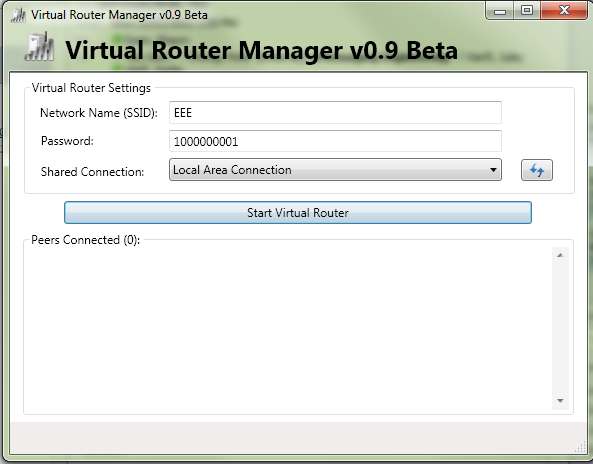
So to get this setup, you just run through the installer and let it install it's service. At the end of the installation you should have a 'VirtualRouterService'. Once the install completes, fire up the Virtual Router software, you should get a screen that looks like this:


Just place your SSID and password in the appropriate fields (you can clearly see I have been playing with WEP) and ensure that your shared connection is whatever your wired ethernet is. Once you have all that setup it is as simple as clicking 'Start Virtual Router'.

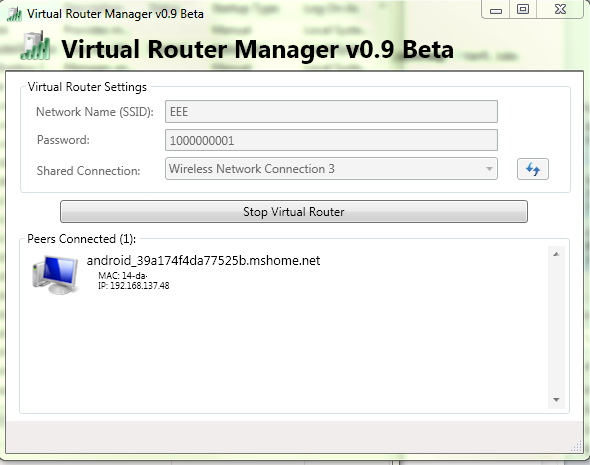
Once your virtual router has started up, you should see most of the fields grey out and the button should change from 'Start Virtual Router' to 'Stop Virtual Router'. You should also see when clicking on your networks in Windows 7 the name of your SSID just below your network connection that has internet access:


You should now be able to connect your Android device to this connection using DHCP. Once your device is connected, you should see this in the Virtual Router window:

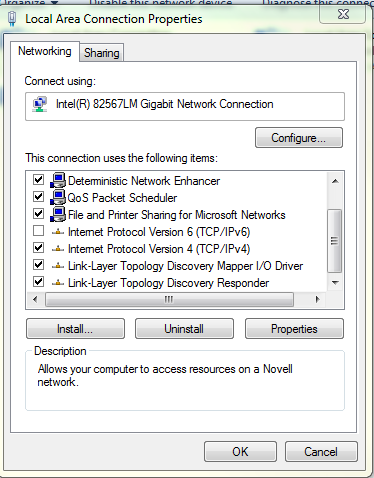
You should have no problems now connecting to the internet with your phone/tablet. If you do happen to run into the 'Virtual Router Could Not Be Started', try disabling the IPv6 functionality for each network adapter by unchecking the box and restart your computer and try again.


This seemed to correct the issue for me and made that error go away.

Here are some of the other links that I had followed to troubleshoot the error:

  • Virtual Router Could Not Be Started Discussion: Lists some command line tricks you can do with netsh. I admit that I did use the command  'netsh wlan set hostednetwork mode=allow ssid=Test key=YOUR PASSWORD GOES HERE'. But the command should only create the ad-hoc network you would get going through the networking wizard.
  • Updated my WiFi drivers.
  • Removed all previous ad-hoc networks I had created.
  • Restarted more than once.


Friday, November 25, 2011

ASUS Eee Pad Transformer TF-101


Alright, the post isn't actually about transformers (which I have been a huge fan of since I was a kid), it is about my TF-101 Asus Eee Pad transformer, which I have been enjoying immensly since I bought it this month.

As I mentioned previously in my about post, I am an avid listener of podcasts and spend a lot of time hearing about the 'next big thing' and the various reviews of them. I am also a regular passenger on the GO transit train system here in Toronto (to commute to work) and in addition to listening to what new tech toys are out there, I get to see them first hand on my way in. So let me tell you first how I got this cool little device, before I get to my thoughts on it and using a tablet in general.

The story behind my eee pad:

For the vast majority of my life being a parent, many things have come in the way of me getting some of these new toys... most parents are familiar with the house bills, kids and other things that generally divert funds away from where I would ideally place them... so needless to say I have been in a constant state of tech envy for years.

About 9 months ago, I started to hear reviews about the Macbook Air and how thin/light it was and everyone seemed to be raving about it, so I thought to myself, that's the computer for me! So I started to run the idea through the budget committee (wife) to see when we could fit this purchase in. To my surprise, it happened not even 2 months later while we were in Best Buy, I was literally minutes from purchasing it, but for some reason decided to hold off on it. After that my approval was revoked for a bit and became busy, so I didn't really think too much on it.

So about 3 months ago I shifted my position on the GO train, which occassionally people do (but not often, you can seriously see the same people everyday in the same spot... almost as if you work with them). Before the move I was used to seeing people and their iPad 1 ; 2's, it was no sweat for me... didn't really have an interest in one. In my new spot I am sitting near an older woman, must be in her 60's and she ALWAYS has her iPad out. This started to bug me. It's not that I don't think that older people shouldn't embrace tech, or even that I really care that she even has an iPad... it was the thought of me, self-proclaimed technofile sitting on a train with an iPhone 3G trying to make the most out of the slow device and there is an older woman, who most likely does not have an interest at all in tech, sitting across from me with newer tech. How is it possible that I am so late to the game that an older woman has newer tech than I do?

After about 2 weeks of watching how wonderfully she played her word games on her iPad I had had enough, I needed to correct this imbalance. So I got thinking on the Macbook Air again, but also on how nice it would be to have some sort of a touch screen. Also being a huge Linux fan, thought that maybe I should get out of the walled garden that is Apple to the more open pastures of Android. Then an ad that I had been seeing a lot recently at Walmart popped into my mind... a tablet with a keyboard! Eureka! That's it, that's what I want! I wanted to try out Android anyway. So I checked it out at Walmart and looked up reviews. Long story short, have an eee Pad transformer that I am now blogging from.

Thoughts on Android:

After nearly 3 weeks or more (not really keeping track) I am really impressed with Android 3.2, can't actually wait to see what 4.0 is going to bring. Before this device all I had was an iPod2G and an iPhone 3G, so I only knew Windows, Linux and iOS. I was pleasantly surprised as to how easy it was to catch on and how many things I preferred on Android vs. iOS. So first, based on my information from my fellow technologists, here are a few things I thought would be a problem with Android:
  • Inconsistency/instability in the platform.
  • Android Market would be the 'wild west' and it would be difficult to find software.
  • Worries about updates to the platform.

To my surprise, when starting to use my TF-101 about the only thing that I couldn't wrap my mind around initially was how the home screens were setup, and how to add/remove items from it. The platform was rock solid, I didn't have any hangs that required rebooting the device and when there was a pesky program that seemed to soak up the CPU, Android told me about it and asked me nicely if I would like to terminate it or wait. 

The Android Marketplace was another surprise (and even more so with the recent changes), I had NO IDEA what I should be putting on this device, but when going to the Marketplace it was a nice surprise to find that most good programs that are in the Apple Appstore are also in the Android Marketplace... or at least the ones that I cared about. This was a no-pain transition, which totally surprised me, but the fact that I am a technical person probably helps that a lot. 

Something that I have heard about in the tech world regarding Android devices are that updates are few and far between. Because of this I thought that perhaps I will get one more major update to the platform for this device before the OS remains static. While that remains to be seen, ASUS has promised ICS for this device so at least I am guaranteed at least 1 upgrade. If you do a little research out on the net, you can quickly quash most worries as there is always Cyanogen mod and if all else fails you can even put Linux on it (which i will likely do when there are no further updates).

Another couple of things that I like about Android specifically is the multi-tasking and the settings. I have been so accustomed to my jailbroken iPhone 3G multitasking (if you can call it that) that I thought it would be the same on Android, but it isn't. Things multitask quite well on the OS and my standard for testing this was the Citrix connection into work with my iPhone vs. my TF-101. With iPhone it 'pauses' the app, so you either end up re-loading the app from the beginning or it will just continue from its paused state, which doesn't work too well for Citrix given that it depends on a network connection. So on the iPhone, if I ever move away from the app, it results in me having to log in which is a complete pain. On the TF-101 I can jump to many different applications and when I move back to Citrix, there it is, waiting for me network connection and all. Closer to true multitasking if you ask me, I would say full, but I have found from time to time apps are paused or unloaded and I have no idea what the process is for that or why it happens.

The settings are also great as there are a lot of things that you can access and change, the specific things that got me were to be able to 1) See what applications are running and kill them. 2) See what applications or things that are killing your battery. Those 2 things are enough to make me think highly of the settings along with the presentation of the settings, but I am sure there are many more things that make it interesting.


Thoughts on the TF-101:

After having this device for a while I think it is one of the best devices out there, and I think it is a ground breaking genre... just not revolutionary, because the concept is nothing new. I like to think of it as the blackberry torch of the tablet world, only in the sense that it is the best of both worlds... you have your touch screen and also a keyboard, the choice is totally up to you. I don't know about you, but I find typing on a tablet a miserable experience no matter what trick you try and believe me I have tried. One I often try is to hoverer my hands just above the keyboard to try and avoid touching the screen. This does not work well, I am certainly not going to get 80 - 100 words per minute this way, and this is what makes me so glad that I have the option of a keyboard.

I know that there are some purists out there that believe that if you are going to have a tablet, it should be just that, a tablet. But I find that to be an extreme point of view because there is no reason why you cannot have both if you want to, and the TF-101 makes that very enticing in a lot of ways. I don't believe the argument should be netbook vs. tablet, it should be about what works.

So here is my list of things that I think are brilliant about the TF-101, we will call it the 'pros' list:

Battery life:

According to specifications, it is supposed to be usable for 16 hours because it actually has 2 batteries, one in the tablet and one in the keyboard dock. I have been using the device an entire day (watching movies (sometimes flash), playing games, typing documents and surfing the web - my typical use case) and I have never gotten the battery down to less than 50%. I can't tell you how great it is to use something and not even give a passing thought to the battery life. This so much better than the 3 hour laptop battery life I am used to, it is a complete breath of fresh air and one of the things that makes the TF-101 such a great device.

One thing you probably didn't know, or at least I didn't see it anywhere is how the 2 individual batteries work together. Not that I know what ASUS had in mind when they developed this, but all indications are that they anticipated that you would use the TF-101 as a tablet before you would use it as a netbook. So, when you undock screen and use it as a tablet you start drawing from the tablet specific battery. But rather than just have the keyboard battery as just an additional battery (which in the event that your tablet battery was near death you would be forced to use the keyboard), they have instead configured the keyboard battery to charge the tablet battery. So you may have to use your keyboard for just a little while, but while you use it you will be charging the tablet for use.

I think this is a terrific idea and one of the things that makes this tablet/keyboard combination work so well.

Storage Capacity:

So by now, living in a world of iOS devices we are used to buying a device with a predetermined amount of space. But with Android that sort of decision is left with the manufacturer and ASUS (and probably most other manufacturers) think that you should have some input on that. So another one of the key things that I love about this device is the options for storage.

Starting with the flash storage, the TF-101 that I bought has a total of 16GB on board, which would set you back $499 on an iPad2, but what it has that the iPad does not is expandable flash storage. On the side of the tablet there is a MicroSD slot that can take flash memory up to 64GB (haven't found a max yet, presumably if it wasn't 64 it would be 32). And as if that is not enough there is an additional SD card to the side of the keyboard dock for a maximum of (160GB of storage, or in my case with the 16GB version, 144GB ==> Onboard Memory + MicroSD + SD). This does not also include the fact that you could plug in an external disk to the device if you had a reason to (which I have not tested yet).

So, if you have a ton of media that you want to carry with you, this is the device for you.

Keyboard:

As I mentioned previously, I can type, so I lose productivity when I can't get text on the screen as fast as I am used to. So it is an added bonus to be able to choose whether or not you can use a keyboard and not having to lug a bluetooth keyboard around with you if you needed one with other tablets. Another side bonus to the keyboard is that it acts as a protective covering for the display, eliminating the need to by a tablet case.

Regarding the keyboard, overall, it is not too bad to type on. Having been using a Thinkpad keyboard for years I find that there is a lot more resistance to this keyboard, which seems to tire my fingers out a bit, but it is livable because in no way is it cramped. The keyboard does have a bunch of nice shortcut keys though that make it quick to do a few things on Android.

The Screen:

There are a couple of key things that are great about the screen, the first is of course the resolution. The screen has a resolution of 1280x800 which is a step up from the iPad2's 1024x768 and makes it feel almost on par with a laptop screen which generally have the same resolution. The resolution is fairly crisp, my wife is always asking my why the same photo looks so good on my tablet than it does on her laptop. The other great features of the display are the viewing angle and the scratch resistant screen, which are nice, but I am not particularly interested in testing.

The Cool Factor:

This won't count for much and it won't last long, but if you want to get those looks of wonder as onlookers see what they thought is your netbook suddenly become a tablet, then the TF-101 does the job. I have received so many looks and questions on how it works and how cool it is... I kind of like it. Reminds me of that feeling you get when you buy the first generation of a car and the looks you get as you drive around in it.

Software:

Though this is not a PC, it does come with many programs that make the TF-101 useful right out of the box, there is:
  • Polaris Office: A tablet office suit.
  • Music (don't think it has a program name): Is a half decent music player
  • Gallery: A photo viewing and categorization app that will also import photos automatically if you happen to plug in a camera or iPhone.
  • File Manager: Which I suspect is standard with Android devices
  • MyNet: Which allows your device to find DNLA devices and play content from them, or use your TF-101 as a DLNA server.
  • MyCloud: Which I most likely will not use (comes with unlimited storage for a year, after you have to pay).

There are a few more that I haven't mentioned as well as the widgets and wallpapers available.

Here are all of the things that I think could use some improvement with the TF-101:

Camera:

Though I don't currently have a decent cell phone camera, the camera on the TF-101 doesn't seem to be that great, particularily the front lower resolution camera. The software is easy enough to use, I just find that it is hard to get a really good picture, especially in low light conditions since there is no flash at the back of the device.
It does take adequate pictures, even better in daylight, but it doesn't seem to look quite as good as the pictures taken from an iPhone4, which has the same resolution.

Keyboard/Tablet Connectivity:

I have been finding with use, especially after the device goes into power saving, that the keyboard sometimes seems to disconnect when you come out of power saving. This has happened on a few occassions where I didn't see the keyboard indicator (that was there before power saving), which forced me to disconnect and reconnect the tablet to the keyboard to get access to it.

Touchpad Sensitivity:

This is a problem that occurs with almost every computer with a touch pad, it just seems that on the TF-101 you have to be extra concious of where your fingers are as at almost every turn I find my cursor moving elsewhere on the screen and often end up typing in the wrong location. Granted, there is a button to turn the track pad on and off quickly I think there should be some additional software that will prevent track pad movements when the keyboard is in use (you see this in Linux often).

Missing keys:

I like the keyboard and do think it was well done, but there are a couple of functions I thought would be nice to have on the keyboard:
  • A delete key: There only seems to be a backspace key.
  • A change apps key: All the other buttons that appear on the screen also appear on the keyboard with the exeption of the switch apps button. Not that it is a terrible problem to actually touch the screen, but it would be better if there was a key you could press to bring up the list of running applications.

Can't connect to ad-hoc wireless networks:

This isn't a TF-101 problem in particular, as I have read all over the net, this is more of an Android problem. Since there is no built in 3G connection, you would need to connect to some sort of mobile network. I have tried with Windows 7 on my laptop and Connectify.me and both have ended up with the TF-101 hanging on obtaining an IP address. I do have a program on my iPhone that turns it into a wifi hotspot and that seems to work just fine, but I just can't seem to share my connection at work.

Summary:

The TF-101 is a great tablet with a lot of fuctionality. Since buying it I have hardly touched my main laptop and am instead using the tablet most of the time. It has been super convenient to have a small, light, long-lasting device that is instant-on when I need to use it. If you are thinking of buying one, don't hesitate, it is an amazing device.